How to Withdraw Money from Coinbase
Want to withdraw money from Coinbase, but unsure where to start? Many users become confused when trying to determine whether to use the mobile app, the web platform, or how to send funds to an external wallet.
The wrong move can lead to delays, errors, or lost funds. This guide explains exactly how to withdraw money from Coinbase to your bank account or external wallet, using both the app and the website. It provides clear, simple steps.
What to do before:
- Complete Identity Verification: Coinbase requires identity verification (KYC) before allowing first-time withdrawals. Ensure you’ve submitted your documents and passed all the checks to avoid delays.
- Link a Bank Account or Wallet: To withdraw money from Coinbase to a bank account, link a valid account in your payment settings. For crypto withdrawals, add your external wallet address. This saves some time.
- Check Network Availability and Limits: For Coinbase Wallet withdrawals, confirm that the selected blockchain network is supported. Also check withdrawal limits, especially for wire transfers.
- Review Security Settings: Enable two-factor authentication (2FA). Coinbase may prompt security reviews during withdrawal to ensure your connection is secure.
- Ensure Account Is in Good Standing: Withdrawals may be restricted if your account is flagged. Check for any alerts or messages on the Coinbase app or web platform.
You can also explore the best crypto-friendly banks for additional support. Alternatively, if you’re withdrawing funds on behalf of a company or managing higher transaction volumes, a Coinbase Business account provides enhanced controls, higher limits, and improved reporting for compliant withdrawals.
How to withdraw money from Coinbase to your bank account via the mobile app
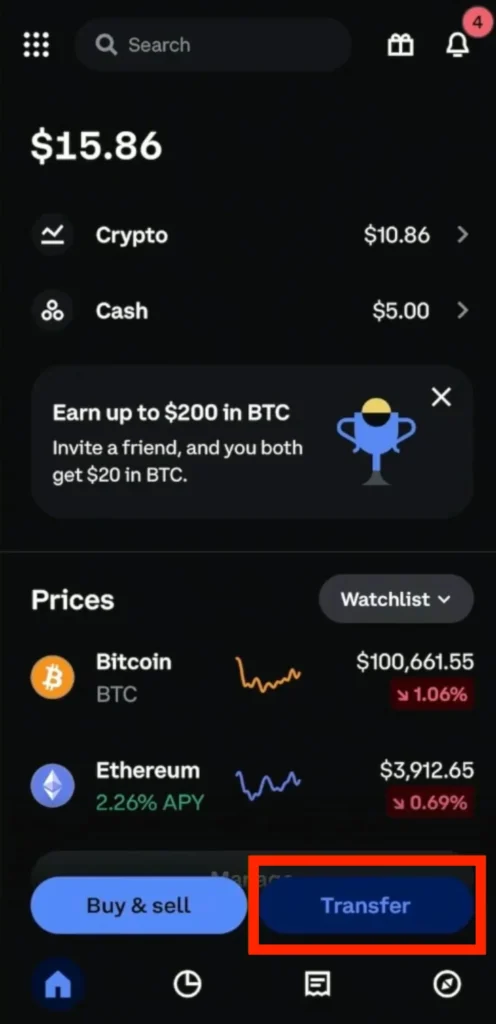
Step 1: Open the Coinbase app, sign in, and tap the transfer button on the home screen
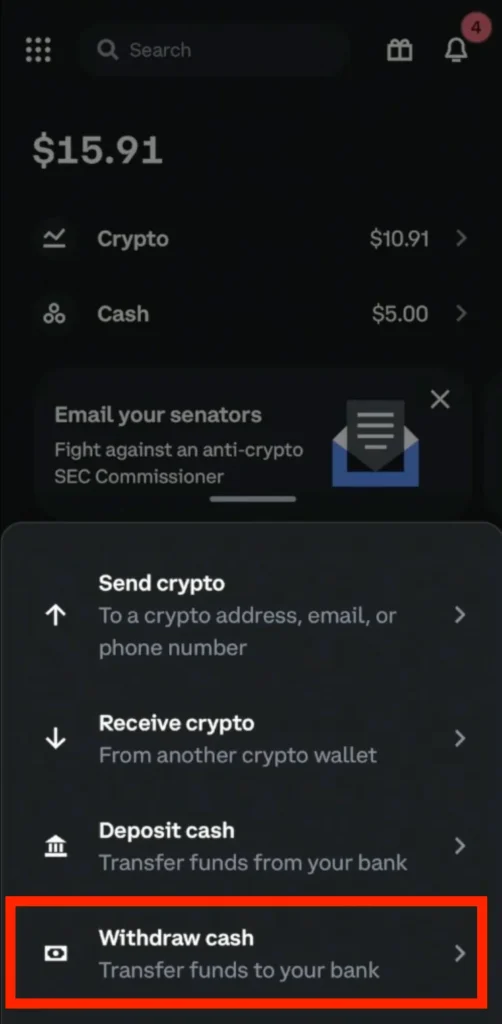
Step 2: Select withdraw cash
Step 3: Enter the withdrawal amount, or tap ‘withdraw maximum amount’ to transfer your full balance
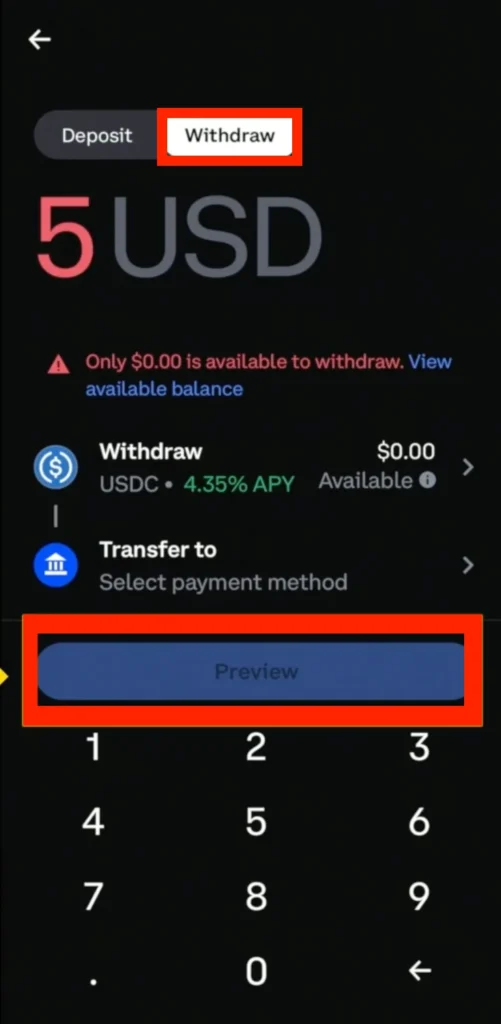
Confirm your selections under ‘Withdraw’ and ‘Transfer to’ (ensure your bank account is correctly linked). Tap Preview to review your withdrawal details.
Step 4: Select Withdraw cash now to complete the process
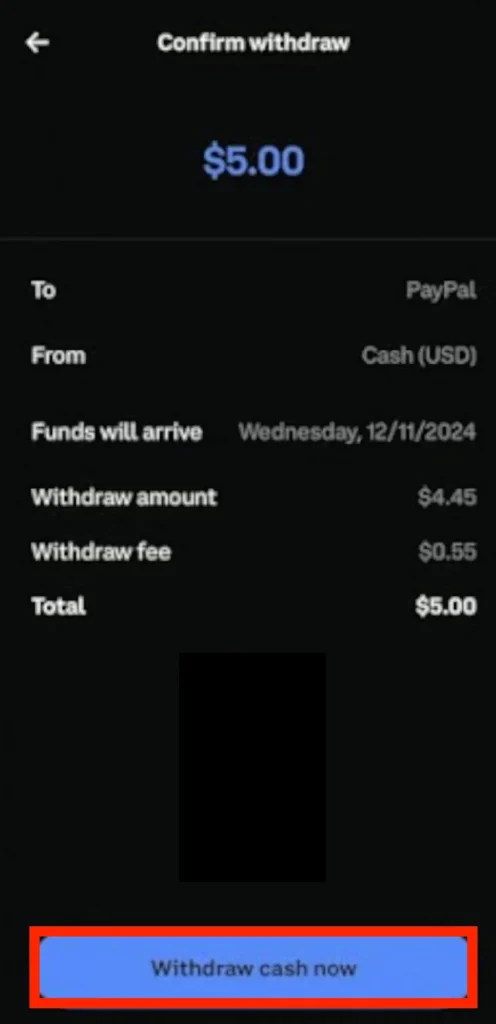
How to Withdraw Money from Coinbase to Your Bank Account Using the Web Platform
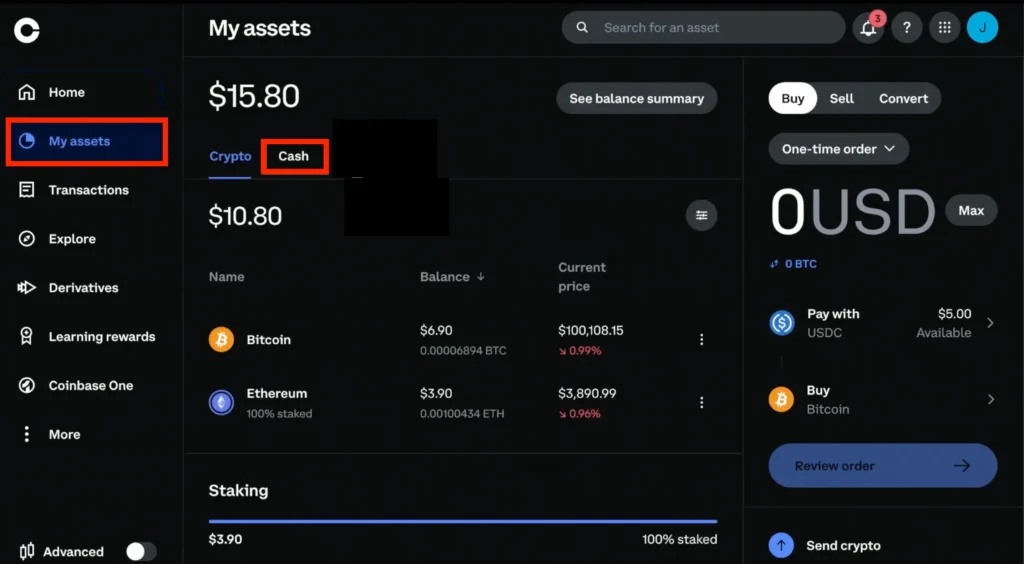
Step 1: Log in to your Coinbase account, go to My Assets, and select Cash
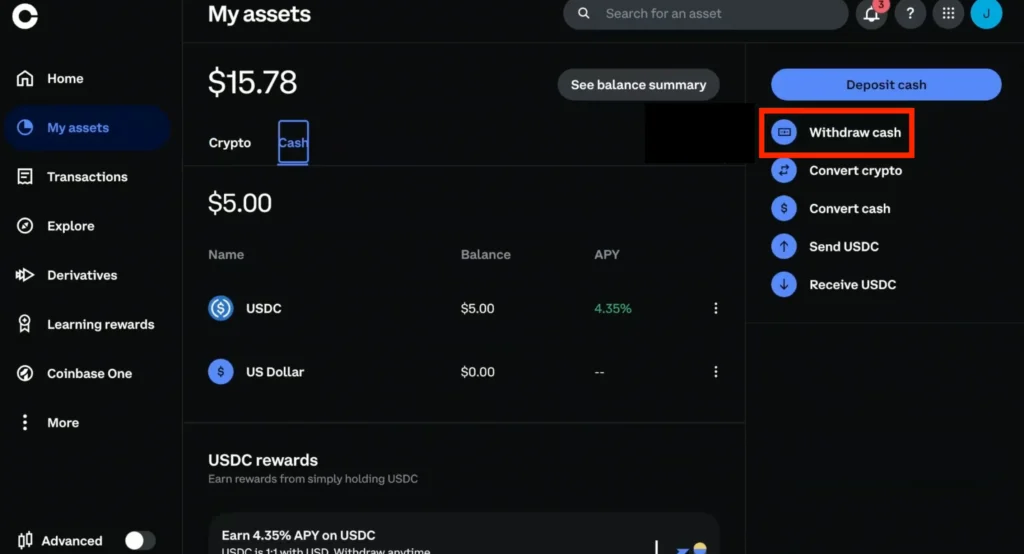
Step 2: In the Cash section, click Withdraw Cash
Step 3: Enter the amount you want to withdraw
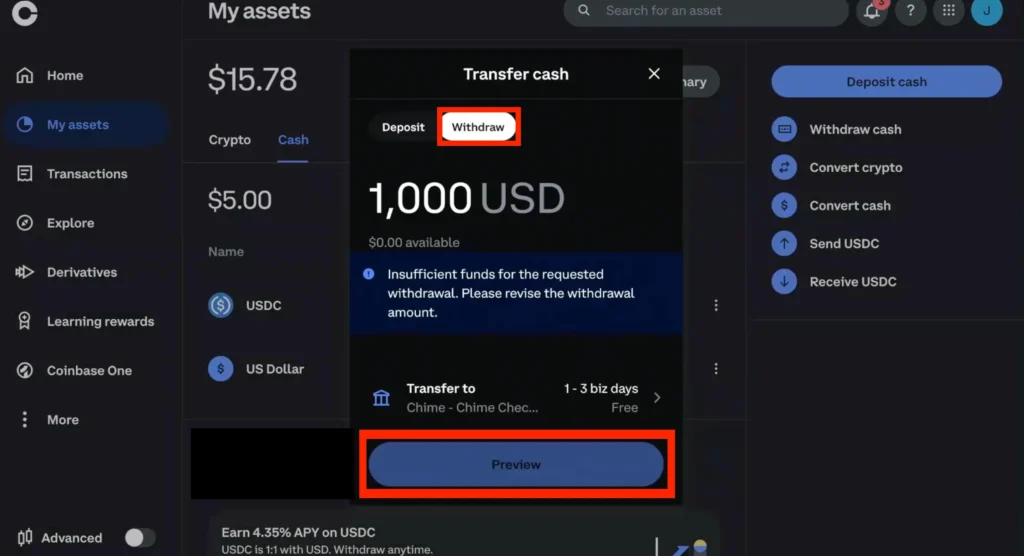
Under Transfer to, choose your linked bank account. After these, click the Preview button. Review the details, then select Withdraw cash now.
If redirected to help.coinbase.com or asked to review the security of your connection before proceeding, wait for help.coinbase.com to respond or reload the page.
Once complete (whether you use the mobile app or the web platform), your withdrawal will show as processing. Most bank transfers arrive within 1–3 business days. If you see a Ray ID or performance security notice, Coinbase will review the request.
How to Withdraw Money from Coinbase to Your External Wallet Using the Mobile App
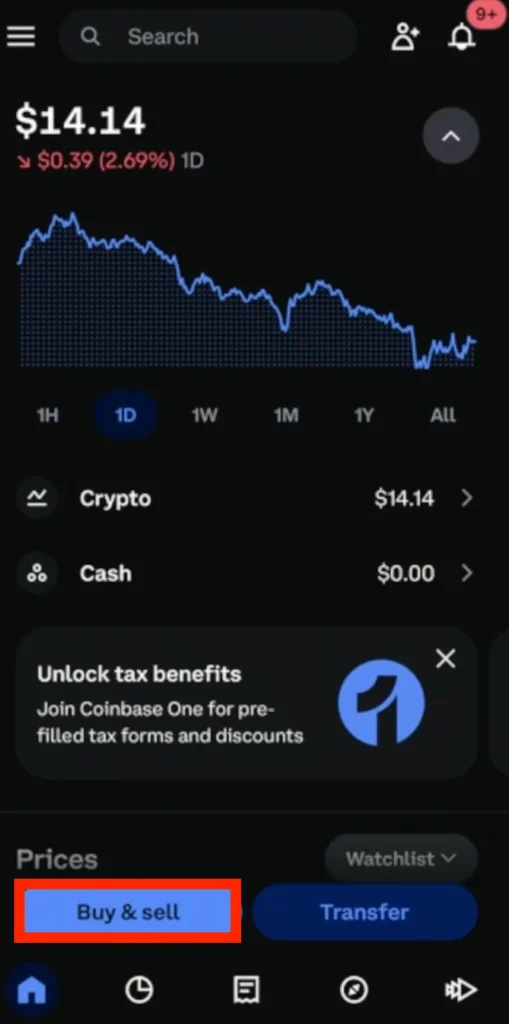
Step 1: Open the Coinbase app and sign in. On the Home section, tap the Buy & sell button
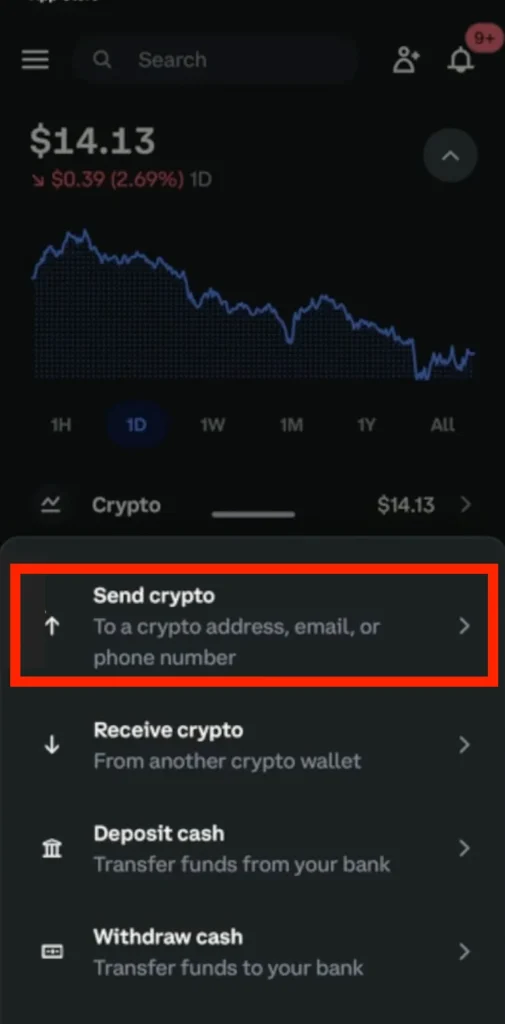
Step 2: Select the Send crypto option
Step 3: Input the recipient’s wallet address and choose the correct blockchain network
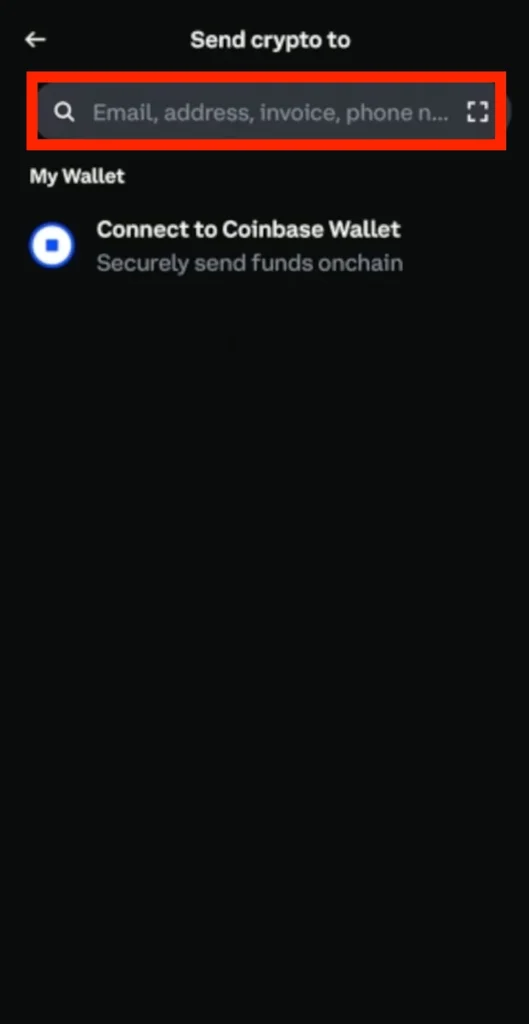
*Using the wrong network will permanently lose your funds.
Step 4: Insert the amount you want to withdraw to an external wallet, and tap Preview
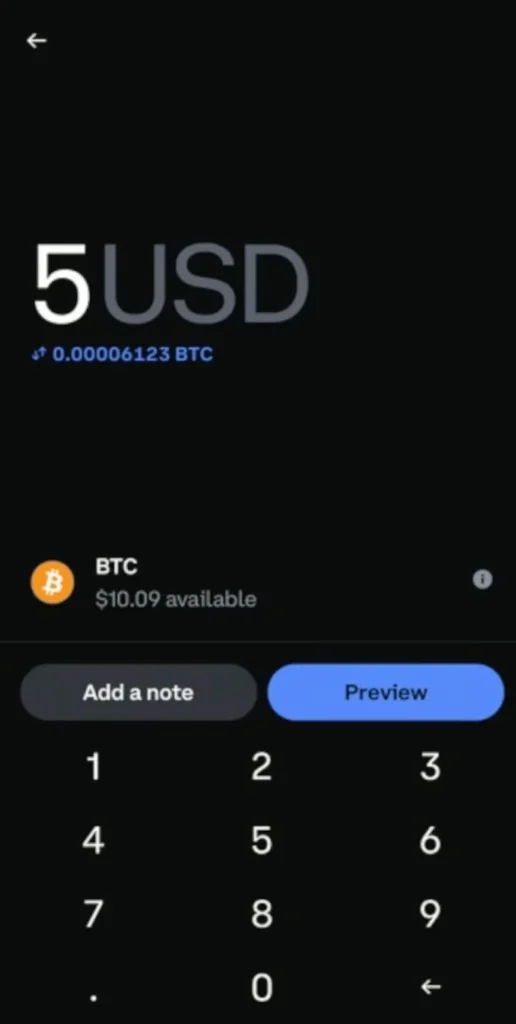
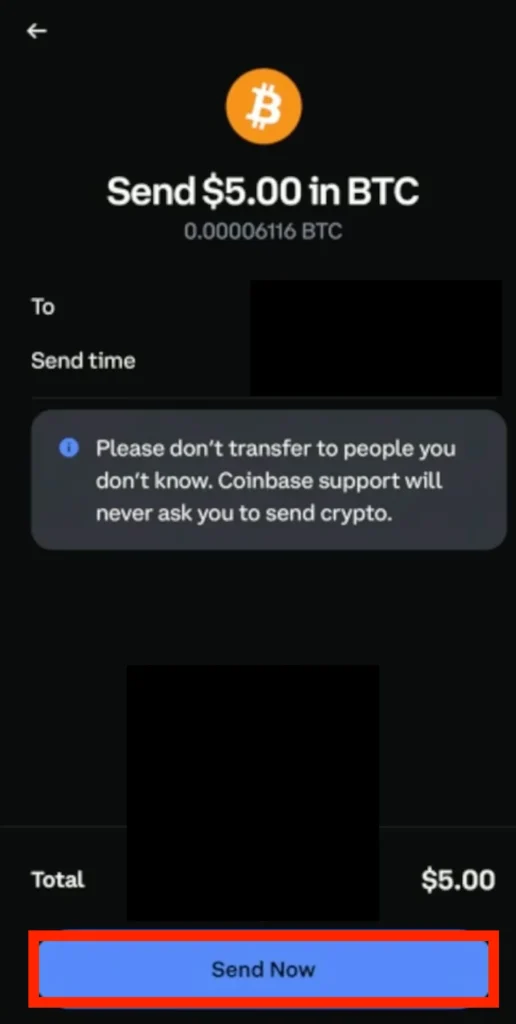
Step 5: Review all transaction details, then select Send Now
How to Withdraw Money from Coinbase to Your External Wallet Using the Web Platform
Log in at Coinbase.com, and if you are redirected to help.coinbase.com, wait for help.coinbase.com to respond. Complete any verification or “Verify you are human” checks to proceed.
Step 1: Start from your dashboard
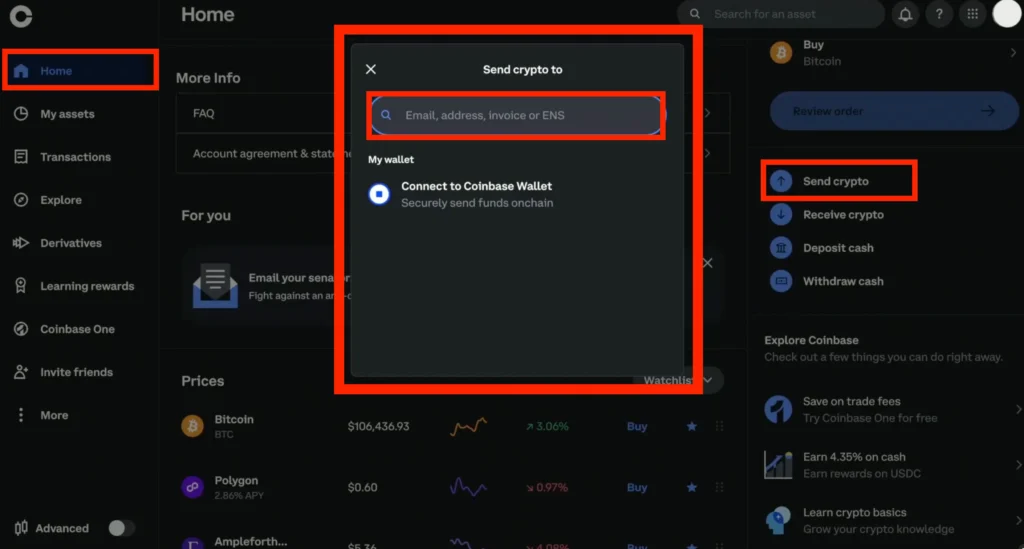
From your Dashboard, select ‘Send crypto’ and, under ‘To’, enter the external wallet address, then select the correct blockchain network. Sending to the wrong network will result in the loss of funds.
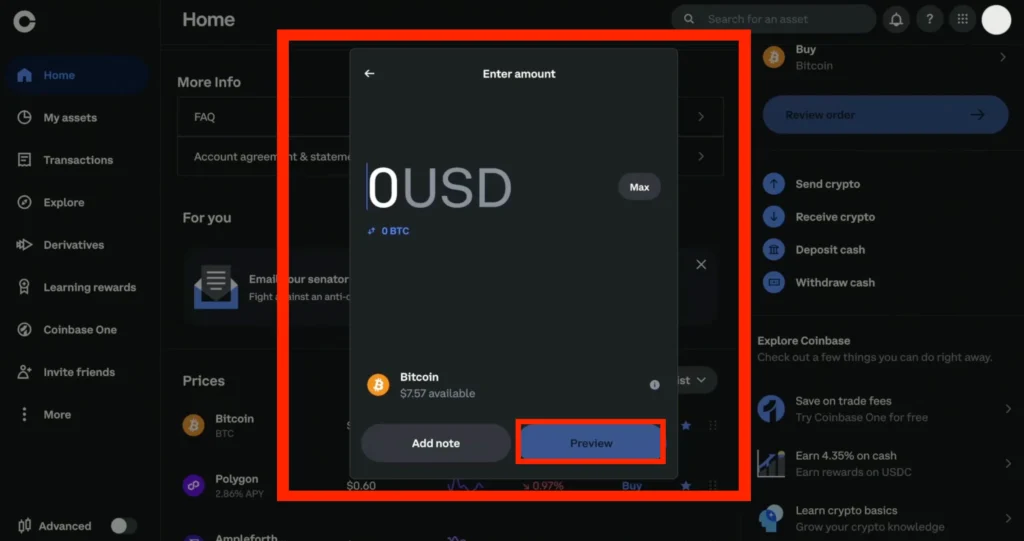
Step 2: Insert the amount and click Preview
Step 3: Review all details and choose ‘Send now’
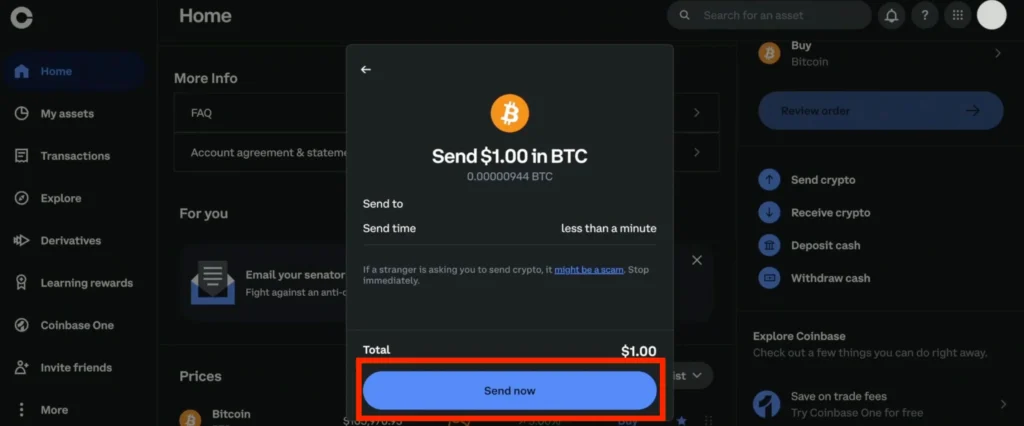
Also, remember that on-chain sends to external wallets are irreversible and include a network fee. Always double-check the recipient address and network.
Please note that Coinbase charges different fees depending on the withdrawal method you choose. ACH bank transfers are usually free, while instant card withdrawals include a percentage-based fee. Want to reduce your costs even further? Read our complete guide on how to avoid Coinbase fees.
If you’re interested in transferring from Binance to Coinbase, we’ve got you. Our guide breaks it all down for you.
FAQs
Withdrawal limits vary depending on the account type and verification level. Most fully verified users can withdraw up to $100,000 per day. Limits apply to both Coinbase wire transfer withdrawals and crypto transfers. Check your exact limit in Settings > Limits on the Coinbase app or web platform.
To increase limits, please complete all identity verification steps, including providing a photo ID and proof of address. Coinbase may also require financial information. You can request a limit review in the Settings > Limits section of your account.
Yes. Withdrawing money from Coinbase to a bank account after converting crypto to fiat is taxable. Coinbase reports these transactions to tax authorities where required.
No. Withdrawing money from Coinbase Wallet to a cold wallet or another personal wallet is not taxable unless it involves a sale, trade, or conversion. You’re moving assets, not cashing out.
Coinbase bank withdrawals via standard ACH take 1–3 business days. Wire transfer withdrawals usually settle within 24 hours. Crypto withdrawals to external wallets are typically processed within minutes, depending on the level of network congestion.
Withdrawing crypto from Coinbase includes a network fee, not a platform fee. The amount depends on the blockchain (e.g., Ethereum or Bitcoin). Coinbase shows the exact fee before confirming the transfer.
You can withdraw crypto from Coinbase to any external wallet, including Coinbase Wallet, hardware wallets like Ledger or Trezor, or another exchange. Always double-check the network and wallet address before confirming.
If you’re stuck waiting for help.coinbase.com to respond or see a message like “help.coinbase.com needs to review your request,” Coinbase is likely performing a security check to complete the action. This can happen during withdrawals that trigger internal risk flags or when account activity appears unusual. In such cases, Coinbase may prompt you to verify you’re human by completing a CAPTCHA or two-factor authentication. Once these checks are complete, you should see a ‘Verification Successful’ message and can proceed with your withdrawal.
Conclusion
Now you know how to withdraw money from Coinbase, whether to a bank account or an external wallet, using the mobile app or the web platform. The steps are clear, the process is simple, and with the right preparation, you can cash out or transfer your crypto without issues.
Follow the right method, double-check networks and wallet addresses, and you’ll avoid delays or lost funds.