How to Add Avalanche to MetaMask (Desktop & Mobile Guide)
Are you trying to add Avalanche to MetaMask but unsure how? With multiple chains, such as C-Chain, X-Chain, and P-Chain, it’s easy to confuse or make costly mistakes.
Using the wrong Avalanche network or an incorrect RPC URL, Chain ID, or block explorer can result in failed transfers or lost AVAX. The process varies slightly on the MetaMask extension vs. the mobile app, making things even trickier.
This step-by-step guide shows you exactly how to manually add the Avalanche C-Chain to MetaMask and through trusted tools like Snowtrace. Whether on desktop or mobile, you’ll be connected and ready to send AVAX in minutes.
Which Avalanche Network Should I Add: C-Chain vs. X-Chain vs. P-Chain?
Avalanche is a multi-chain ecosystem consisting of three primary chains:
- X-Chain (Exchange Chain): Used for sending and receiving AVAX, but not compatible with MetaMask.
- P-Chain (Platform Chain): Supports staking and validators but is incompatible with MetaMask.
- C-Chain (Contract Chain): Fully EVM-compatible, and the only chain you can connect to MetaMask.
To interact with dApps or DeFi platforms on Avalanche using MetaMask, you must connect to the Avalanche C-Chain.
How to Add Avalanche to MetaMask on Desktop (Browser Extension)
Step 1. Open MetaMask Extension
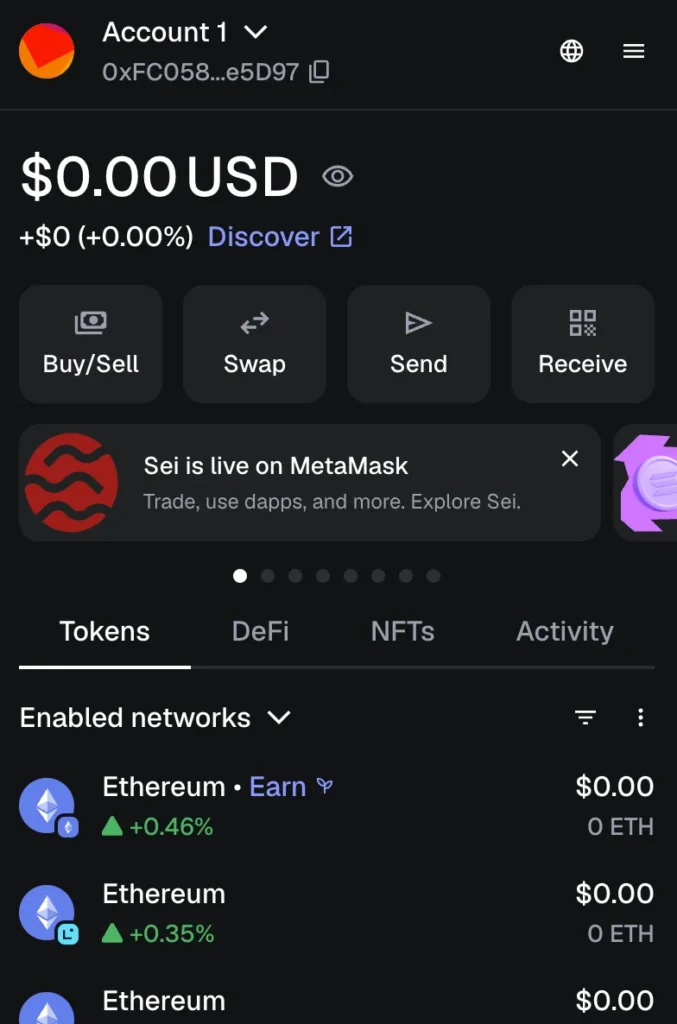
- Launch your MetaMask browser extension on Chrome, Firefox, Edge, or Brave.
- Unlock your wallet using your secure password.
Step 2. Open the Network Menu
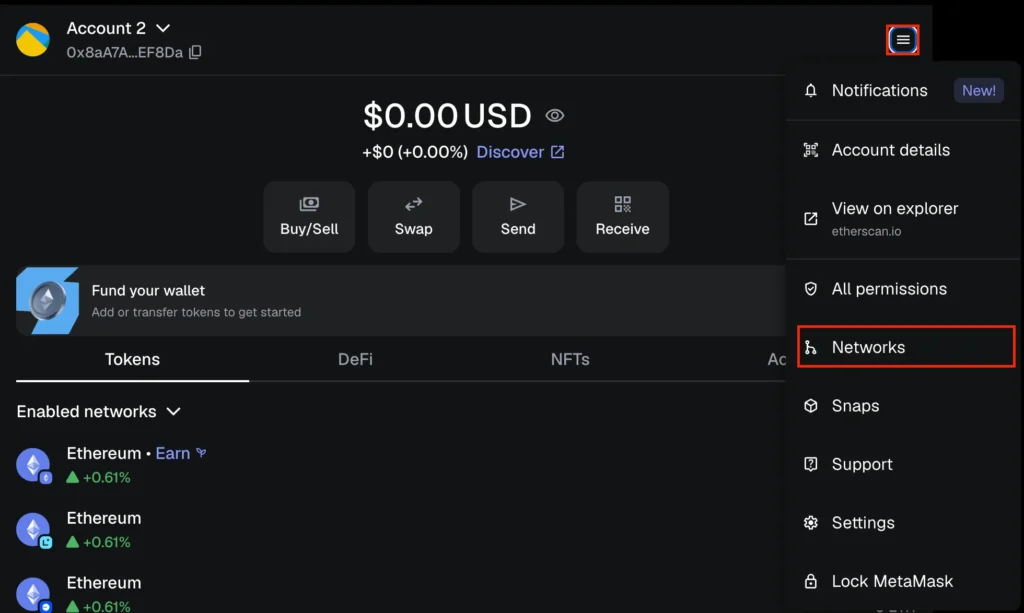
- Tap the menu (☰) in the top right corner.
- Select “Settings” → “Networks” (default is usually “Ethereum Mainnet”).
Step 3. Add Avalanche C-Chain
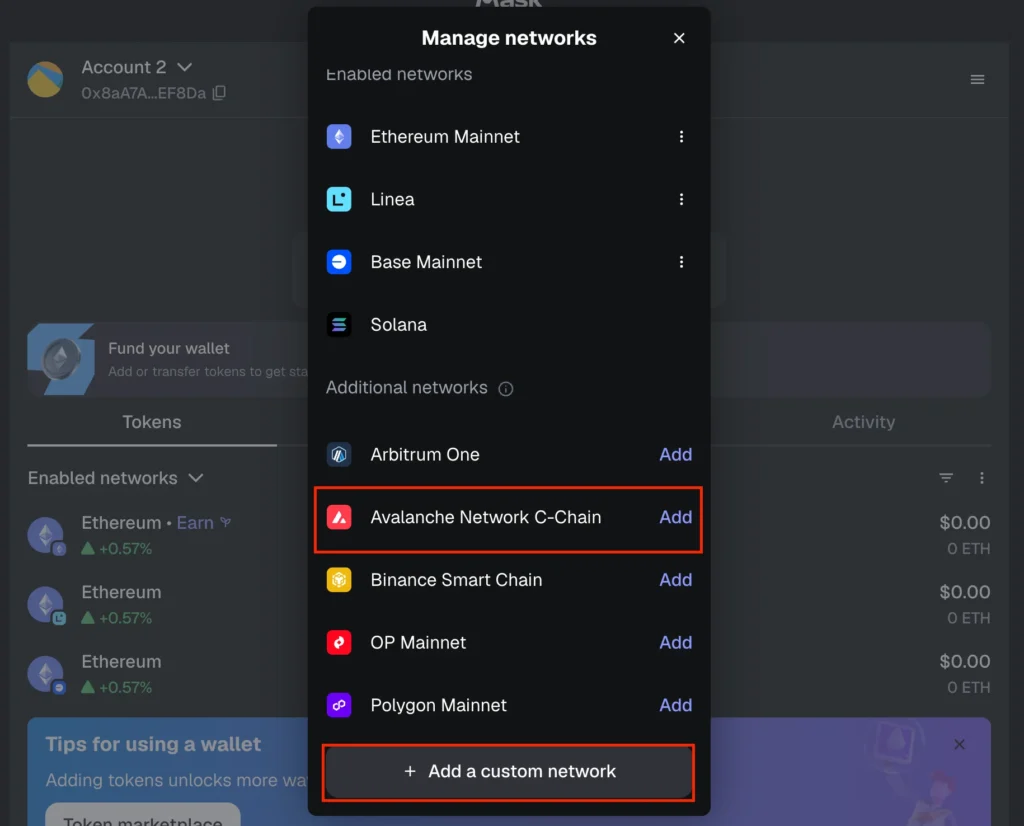
- Tap the “Add” button next to Avalanche Network C-Chain to connect automatically.
- If the option doesn’t appear, tap “Add a custom network” and manually enter the details.
In the new browser tab that opens, fill in the Avalanche C-Chain details:
- Network Name: Avalanche Network
- New RPC URL: https://api.avax.network/ext/bc/C/rpc
- Chain ID: 43114
- Currency Symbol: AVAX
- Block Explorer URL: https://snowtrace.io/
Click “Save” to confirm and connect.
Your MetaMask wallet is now connected to the Avalanche C-Chain.
How to Add Avalanche to MetaMask on Mobile
Step 1. Open MetaMask Mobile App
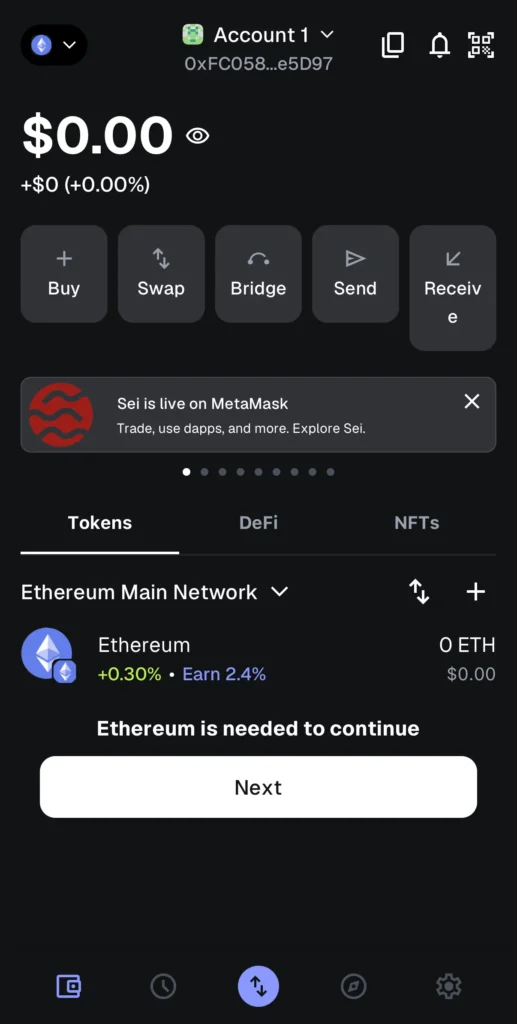
- Launch the MetaMask app on your Android or iOS device.
- Unlock it using your Face ID or password.
Step 2. Access Network Settings
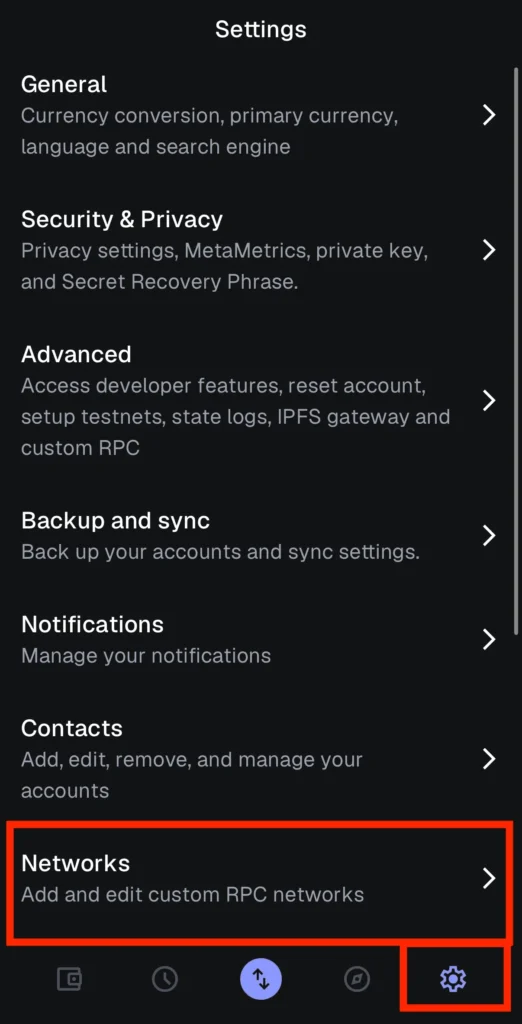
- From the bottom navigation bar, tap “Settings” (located in the lower-right corner).
- In the Settings menu, select “Networks.”
- Next, tap “Add Network” to proceed.
Step 3. Enter Avalanche C-Chain Network Details
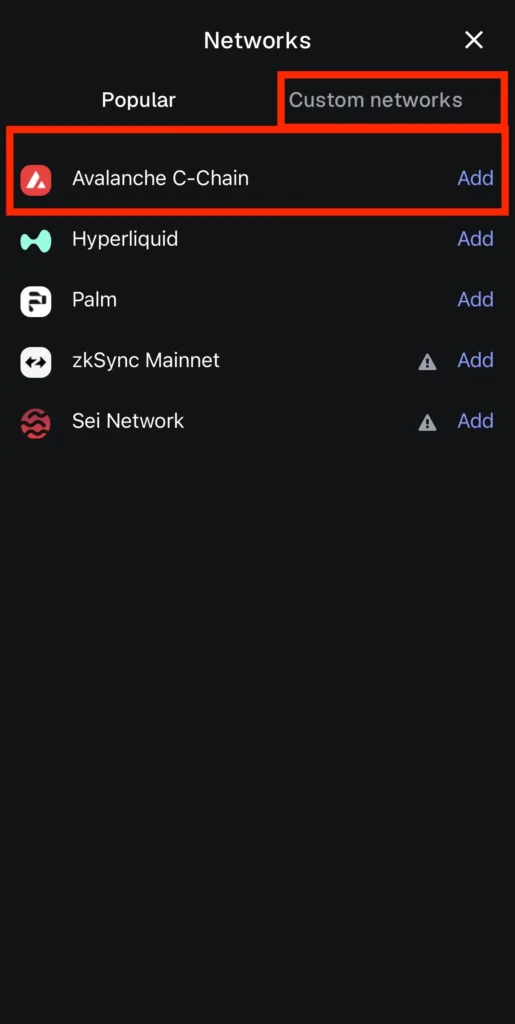
- After tapping “Add Network,” you’ll see a list of popular blockchain networks. If Avalanche C-Chain appears, simply tap “Add” next to it.
- If it doesn’t appear, tap “Custom Networks” and manually enter the Avalanche C-Chain Network details.
- Once completed, tap “Add” to instantly connect to the Avalanche network.
EXTRA: How to Add Avalanche to MetaMask Using Snowtrace
A quick way to add the Avalanche C-Chain to your wallet is through Snowtrace, the official AVAX block explorer URL. It directly integrates with the MetaMask extension and supports all major browsers.
Step 1. Visit the Snowtrace Website
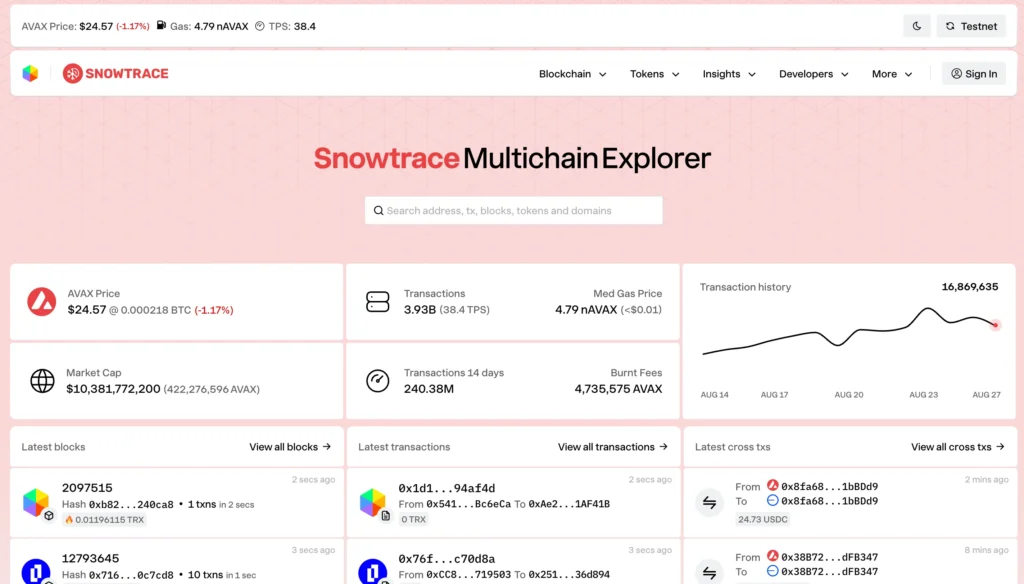
Go to the official Avalanche blockchain explorer: https://snowtrace.io/
Step 2. Scroll to the Footer
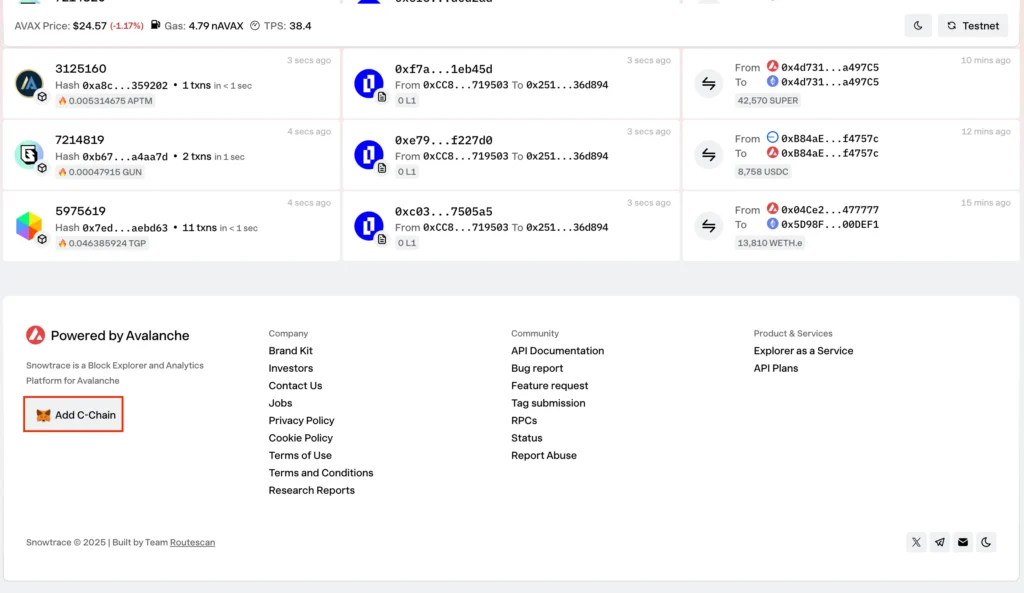
At the bottom of the page, click the “Add C-Chain Network” button. This feature streamlines the process of adding custom blockchain networks, such as Avalanche.
Step 3. Approve the Network Connection in the MetaMask Account
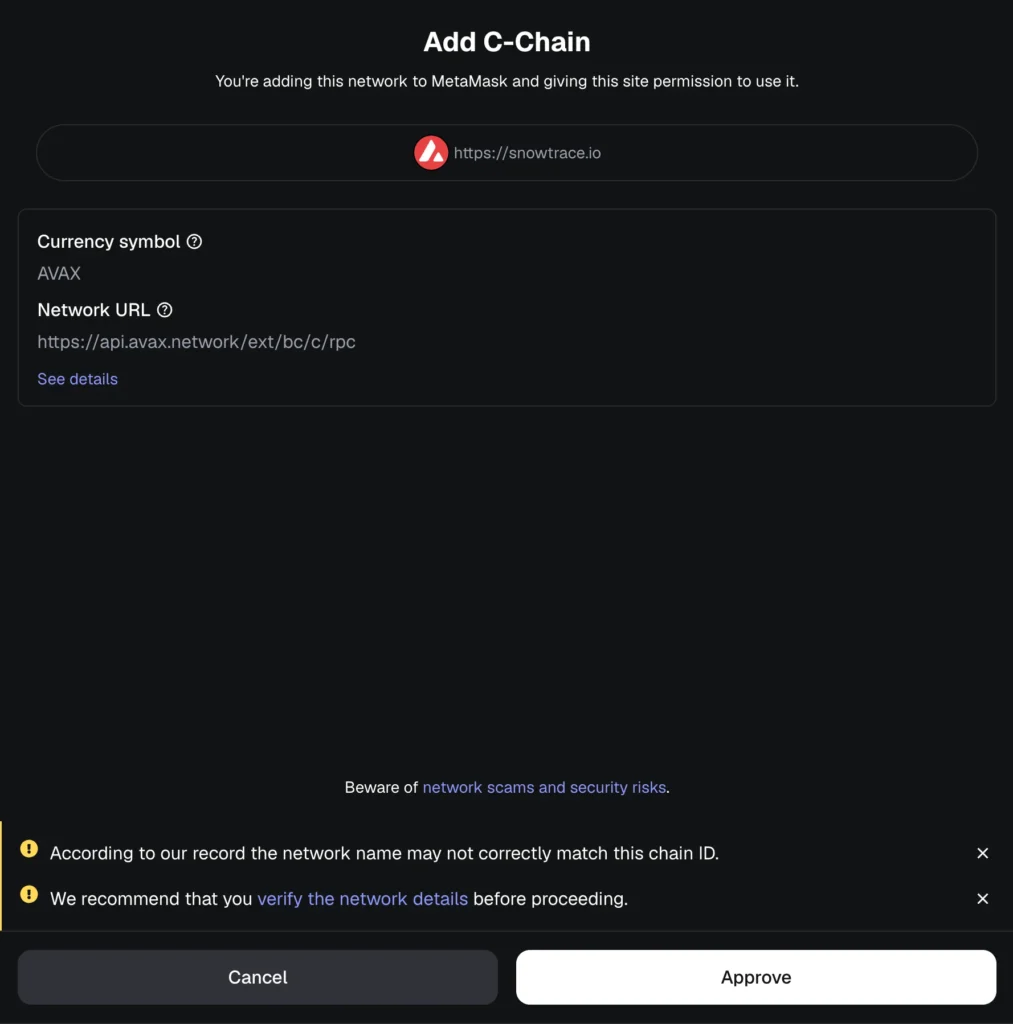
A pop-up window will appear from your MetaMask wallet. Tap “Approve” and then “Switch Network” to connect instantly (or use the network dropdown menu). You’re now using Avalanche C on MetaMask and can explore the full blockchain ecosystem.
Avalanche C-Chain Network Details for MetaMask
For quick reference, here are the official Avalanche C-Chain parameters if you didn’t see them above in the article (mandatory for adding the network manually):
| Field | Value |
| Network Name | Avalanche Network |
| RPC URL | https://api.avax.network/ext/bc/C/rpc |
| Chain ID | 43114 |
| Symbol | AVAX |
| Block Explorer | https://snowtrace.io/ |
You can also use ChainList.org or Snowtrace.io to add the Avalanche network automatically with MetaMask connection permissions.
Troubleshooting: Avalanche Not Showing in MetaMask?
If Avalanche isn’t appearing in your MetaMask wallet:
- Ensure you’re using the C-Chain, not X-Chain or P-Chain.
- Double-check the RPC URL and Chain ID values.
- Try reconnecting via ChainList.org or Snowtrace.io for a quick, error-free setup.
- Use an up-to-date browser and verify you’re using the official MetaMask website to download the extension or app.
Other Wallets Compatible with Avalanche
MetaMask isn’t the only option for interacting with Avalanche. Other secure wallets that support Avalanche C-Chain include:
Software Wallets
- Trust Wallet;
- Coinbase Wallet;
- Core Wallet by Ava Labs;
- Exodus Wallet;
- Guarda Wallet.
Hardware Wallets
- Ledger Nano S/X (via MetaMask or Avalanche Wallet);
- Trezor;
- SafePal;
- Keystone;
- ELLIPAL.
Using a hardware wallet increases protection by keeping private keys offline.
FAQ
What is Avalanche (AVAX)?
Avalanche is a decentralized smart contract platform built for high speed, low fees, and scalability. With sub-second finality, AVAX supports Ethereum-compatible dApps while also offering its own ecosystem of DeFi platforms and NFT marketplaces. It enables developers to launch custom blockchains using Subnets, making it one of the most flexible blockchain architectures today.
What is MetaMask?
MetaMask is a non-custodial cryptocurrency wallet that enables users to interact directly with Ethereum and other EVM-compatible networks from their browser or mobile app. Users can connect to custom networks, such as Avalanche, BNB Chain, and Polygon, enabling seamless multi-chain interaction.
Is the Avalanche Blockchain Secure?
Avalanche uses a Snowman consensus protocol for high throughput, rapid finality, and resistance against 51% attacks. With over 1,000 validators, it’s considered one of the most secure Layer-1 networks in the blockchain space.
Is MetaMask a Secure Wallet?
Yes, if you manage it correctly. MetaMask is a self-custodial wallet, meaning you have full control over your private keys. Always store your seed phrase offline, enable biometric or password protection, and never share credentials.
Can MetaMask Receive Avalanche?
Yes, but only through the C-Chain network. Always ensure that your AVAX transfers are made using C-Chain addresses, especially when withdrawing from exchanges or moving from the Avalanche Wallet.
Can MetaMask Support Multiple Blockchain Networks, Like Avalanche?
Yes. MetaMask allows users to connect to multiple blockchain networks using the “Add Network” option, including the Avalanche blockchain.
How Do I Import Avalanche Tokens and Track Them in MetaMask?
After adding the Avalanche Mainnet C-Chain, you can import Avalanche tokens by pasting their token contract address in MetaMask. Use the AVAX block explorer URL to find accurate token details.
Final Thoughts
Connecting MetaMask to the Avalanche C-Chain opens up seamless access to the expanding Avalanche ecosystem. You can interact with dApps, NFTs, and DeFi tools from your browser or mobile device. Whether you’re looking to transfer funds, stake AVAX, or explore new tokens, the process is straightforward and secure.
As with any blockchain interaction, be sure to keep track of transactions to ensure accurate cryptocurrency tax reporting. Adding other networks later will follow a similar process, making MetaMask a flexible tool for managing multiple chains in one place.