How to Delete Binance Account
Trying to figure out how to delete your Binance account shouldn’t feel harder than trading crypto. Yet for many users, it does. Hidden settings, frozen balances, and unclear rules can quickly turn a simple task into a frustrating experience.
Even a small misstep can lock your account, delay withdrawals, or leave you wondering whether your data is truly gone. It’s no surprise that so many users end up feeling stuck.
This complete guide cuts through all that confusion. Below, you’ll find a step-by-step process that shows you exactly what to do to close your account safely, quickly, and without unexpected issues.
Let’s walk through it smoothly.
Before You Delete Your Binance Account (Important Pre-Steps)
Properly prepare your account before deletion. Binance requires that all funds and positions be cleared, and no pending transactions. Follow the detailed steps below for a smooth procedure.
1. Withdraw All Crypto Assets
Binance requires your crypto balance to be zero before you can delete your account. Ensure that you move all assets you hold across crypto exchanges or personal wallets.
How to transfer crypto:
- Go to Wallet, then select Spot, choose the coin, and select Withdraw.
- Enter your external wallet address or the address of another exchange.
- Double-check the network (e.g., ERC20, BEP20, TRC20) to avoid lost funds.
Withdrawal fees: Each network charges a different fee. Binance will show the exact cost before confirming the transaction.
Network confirmation time: Transfers may take a few minutes or longer, depending on blockchain congestion. Keep in mind that some networks (like Bitcoin or Ethereum) may require multiple confirmations.
2. Convert & Withdraw Fiat Currency
If you hold fiat currencies (USD, EUR, GBP, etc.), you’ll need to withdraw them before deleting your account.
Supported withdrawal methods:
- Bank shift (SEPA, SWIFT, local banking rails depending on region).
- Third-party payment partners (varies by location).
Tips for smooth bank withdrawals:
- Ensure your bank details match your verified Binance identity.
- Check cut-off times, bank transfers may take 1–3 business days.
- Some banks may reject crypto transfers; check ahead.
Minimum limits: Binance may enforce minimum withdrawal amounts. If your remaining balance is too small, consider converting it into another asset or using BNB Convert Dust to settle it.
3. Close Open Orders & Positions
Account deletion is not possible if anything is still “active” on your Binance profile.
What to check:
- Spot orders: Cancel any open buy/sell orders.
- Margin positions: Repay borrowed funds and close all active trades.
- Futures positions: Close positions and move any leftover funds back to your Spot wallet.
- Earn products: Redeem locked savings, staking, liquidity farming, or auto-invest plans.
- Sub-accounts: Ensure that every sub-account has a zero balance and no open trades.
Review each position to avoid unintended losses; deletion is a serious step, so accuracy matters.
4. Export Transaction History (Optional but Recommended)
If you choose to delete your account, note that access to your trading and withdrawal history will be lost. Exporting this data is optional, but it can save you headaches later.
Why it matters:
- Helps with tax reporting and compliance;
- Useful for accounting or portfolio tracking;
- Prevents losing access to certain information after the account is removed.
How to export CSV files:
- Go to Wallet: Transaction History;
- Select the date range (Binance allows custom ranges);
- Download files in CSV format for trades, deposits, and withdrawals.
Disable vs Delete Binance Account (Key Differences)
Before you act, it’s essential to determine whether you need to temporarily disable your account or permanently delete it. Although both options restrict access, they serve very different purposes, and choosing the wrong one can lead to unnecessary delays or irreversible loss of access.
What does “Disable Account” mean?
Disabling your Binance account is a temporary security measure, not a permanent action.
Key points:
- Temporary lockout: Your account has been frozen to prevent unauthorized access, especially if you suspect your credentials have been compromised.
- Funds remain intact: All crypto, fiat balances, and trading history stay untouched and recoverable once you reactivate the account.
- Reversible: You can restore access at any time by contacting Binance support or completing the identity verification steps.
Best for:
- Lost or hacked device;
- Suspicious account activity;
- Temporary break from trading;
- A solution for quick security concerns.
Disabling is essentially putting your account “on pause.”
What does “Delete Account” mean?
Deleting your Binance account is a permanent action and cannot be undone.
Key points:
- Full account closure: Binance removes your ability to log in, trade, withdraw, or manage assets.
- Irreversible: The account will be permanently deleted after confirmation.
- Compliance-based retention: While access is removed, Binance may still retain certain KYC/AML data for regulatory reasons (common across financial platforms).
Best for:
- Switching exchanges;
- Leaving Binance permanently;
- Privacy reasons;
- Closing unused accounts for security hygiene.
How to Delete Binance Account (Step-by-Step Guide)
You can easily delete your account on the Binance platform once your funds and positions are fully cleared. Follow the steps below to safely and permanently remove your account.
Disclaimer. The steps below outline how to permanently delete a Binance account using the web platform. The process is almost identical in the Binance App, so you can follow the exact instructions there as well.
Step 1: Log In to Your Binance Account
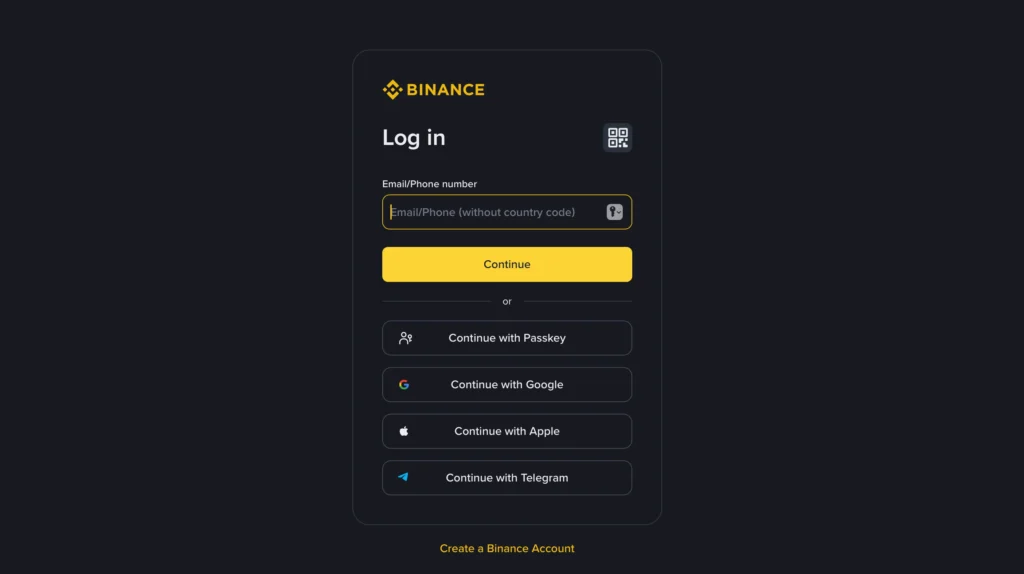
Start by signing in to your Binance account using your email, phone number, or preferred login method. For security reasons, Binance may request two-factor authentication (2FA) confirmation before allowing access to account settings.
Step 2: Go to “Security” Settings
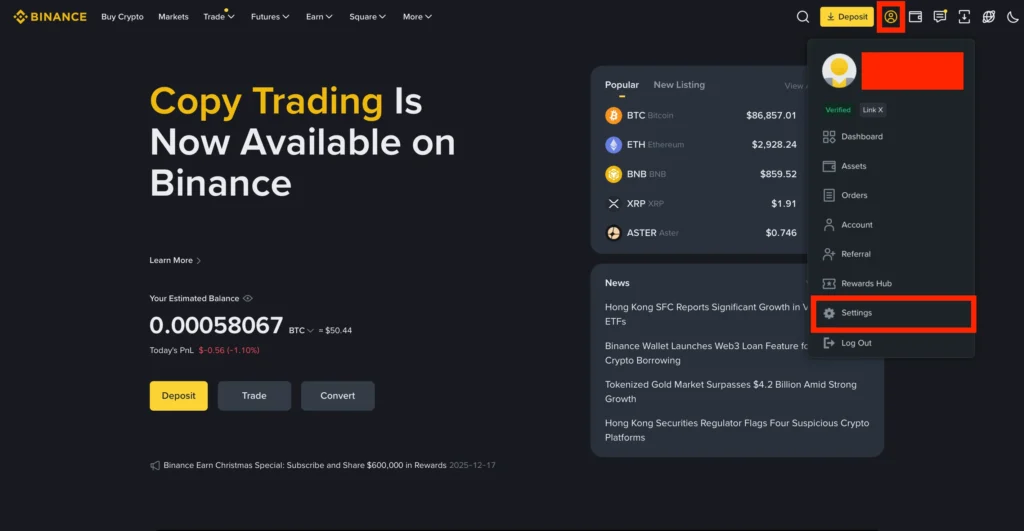
Once logged in, navigate to:
- Profile Icon (top right) → Settings → Security Page
This section encompasses all major security controls, including password management, two-factor authentication (2FA), and account activity options.
Step 3: Scroll Down to the Privacy Section and Press “Delete Account”
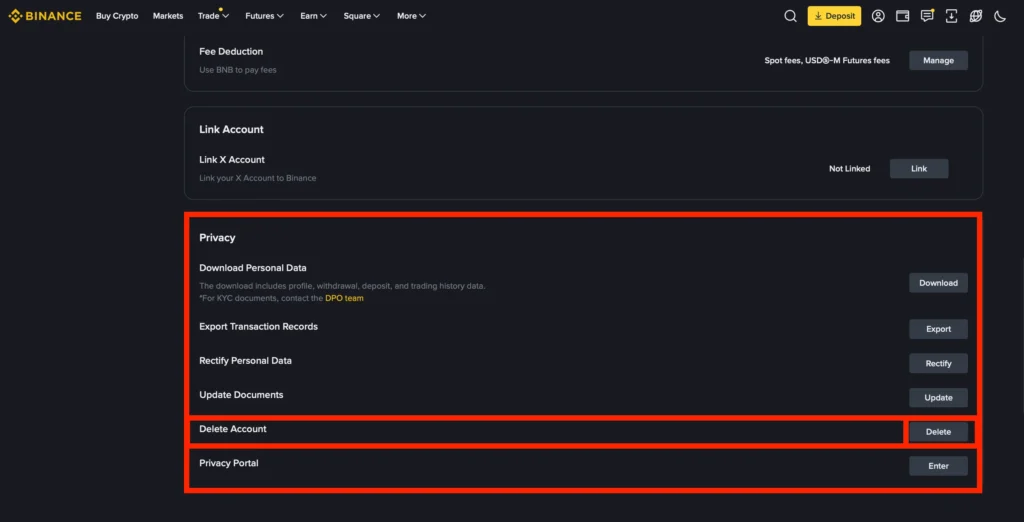
Once you’re in Settings, scroll down to the Privacy section and select Delete Account. No need to panic if you tap it by mistake, as your Binance account won’t be removed immediately; as additional verification steps are required before you can permanently delete your Binance account.
After selecting the option, a new window will appear to guide you through the process of permanently closing your Binance account.
Step 4: Complete the Additional Information and Check Eligibility
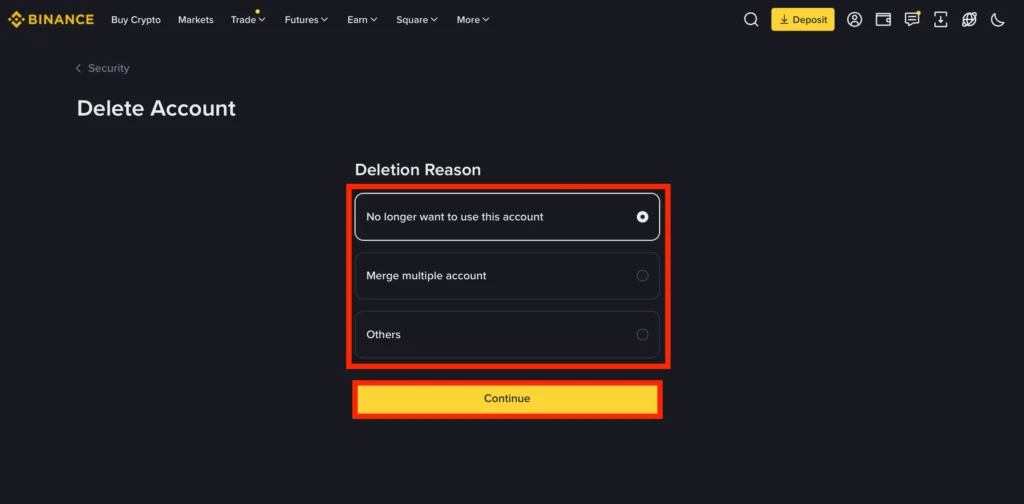
When the new window opens, choose a reason for deleting your account and confirm that you accept the terms of the deletion process.
Before your request can proceed, Binance will automatically verify that your account meets all the requirements for closure:
- All balances must be below $5;
- No open orders or active positions;
- No locked assets in Earn or Staking;
- No pending deposits, withdrawals, or P2P transactions;
- No account restrictions, holds, or unresolved verification issues, and others.
If any of these conditions aren’t met, resolve them first, as you won’t be able to proceed to the final step.
Step 5: Complete Verification & Confirm Permanent Deletion
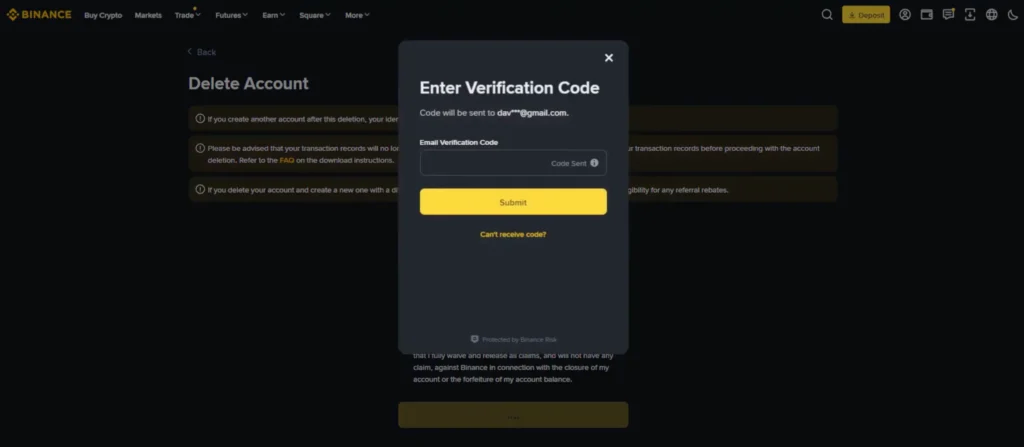
Once all deletion requirements are met, Binance will send a verification code to your email. Open the message, copy the code, and enter it on the Binance platform. Take a moment to be certain you want to delete your account; if you’re fully sure, click Submit to finalize the request.
What Happens After You Delete Your Binance Account?
Once you complete the deletion procedure, your Binance account is permanently closed and cannot be reaccessed. While the action is final on the user side, several important things happen behind the scenes.
Your Login Access has been Removed Immediately
As soon as the deletion request is approved, all access to your profile is blocked. You won’t be able to:
- Log in with your email or phone number;
- Recover your account through the “Forgot Password” system;
- Use API keys or linked third-party apps;
- Access your dashboards, wallets, or order histories.
For all practical purposes, your account no longer exists.
Your Trading Profile Becomes Permanently Closed
Your entire trading setup is removed from the platform, including:
- Personal settings;
- API configurations;
- Saved addresses and preferences;
- Security configurations (2FA, biometrics, etc.).
These settings cannot be restored, even if you create a new Binance account later.
Your Assets, Balances, and Orders Are Locked Out From Binance
Since deletion is only possible with a zero balance, all funds should have already been withdrawn. After deletion:
- You can no longer receive transfers to this account.
- Any deposits mistakenly sent to old addresses may be lost.
- Binance will not reactivate your wallet to recover future transfers.
This makes it extremely important to stop using any saved deposit addresses before initiating the deletion process.
Your KYC & AML Data Enters Regulatory Retention
Although your account is closed, Binance, like all regulated exchanges, must store certain user records for compliance purposes. This is not unique to Binance; it applies to all licensed financial institutions.
Typical data that may be retained:
- Identity verification information;
- Transaction logs required by financial regulators;
- Risk-monitoring or fraud-prevention records.
Retention periods vary by jurisdiction, but this data is stored securely and cannot be used to reopen your account.
Customer Support Can No Longer Restore Your Account
After deletion, Binance support cannot:
- Reactivate your old profile;
- Recover lost access;
- Send or retrieve previously deleted user settings.
The only option is to create a completely new account (with a fresh verification process) if you ever want to return to Binance.
Common Issues When Deleting a Binance Account
Even if you follow every step correctly, you may still encounter a few roadblocks during the account deletion process. These issues are common among Binance users and can usually be resolved quickly once you understand what’s causing them.
1. “You Still Have Assets in Your Account”
Even tiny balances (sometimes just a few cents) can prevent the system from approving your deletion request.
Why it happens: Residual amounts may remain after trading fees, rounding conversions, or partial liquidations. These “dust” balances aren’t always visible at first glance.
How to fix it:
- Use Convert Dust to BNB to clear small leftover amounts.
- Forward any remaining coins to an external wallet or convert them into a supported asset with a low withdrawal minimum.
- Check sub-accounts, funding wallets, and margin wallets;
Once every wallet shows 0, you can restart the account closure steps.
2. “Pending Transactions”
A single pending withdrawal, deposit confirmation, or settlement can temporarily block the deletion request.
Why it happens: Blockchain confirmations, cross-chain transfers, or bank processing times may cause delays in transaction status updates.
How to fix it:
- Wait for the transaction to complete and refresh the status page.
- Check networks known for congestion (e.g., BTC, ETH).
- Review P2P or convert transactions; these can also remain “processing” for a short time.
3. “Identity Verification Required”
Some users are surprised to see Binance request additional KYC steps just before they attempt to delete their account.
Why it happens: For security and compliance, Binance may require identity confirmation if:
- Login attempts were unusual;
- The account hasn’t been verified fully in the past;
- Activity patterns appear suspicious;
- You’re deleting the account from a new device or location.
How to fix it:
- Complete the requested KYC prompt (ID scan, facial verification, or security confirmation).
- Ensure your device camera and lighting meet verification requirements.
- Retry the deletion procedure once the verification status updates to “approved.”
FAQ
In most cases, deleting a Binance account takes only a few minutes once all balances and open positions are cleared. If additional verification is required, the procedure may take slightly longer. Once approved, the account is permanently closed.
Yes, Binance can temporarily deactivate or restrict accounts for security reasons, suspicious activity, or incomplete verification. Users can also choose to disable their account as a precaution manually. Unlike deletion, deactivation is reversible.
You can create a new Binance account using the same identity documents, but only after the old account is entirely deleted or closed. Binance must verify that your previous account is no longer active. A fresh KYC procedure will be required for the new profile.
You can remove your profile through the Manage Account area, but Binance requires a few checks before accepting a deletion request. As of December 2025, head to Account Management, open the Privacy controls, and select the option to permanently delete your Binance account. Binance will verify that your balance is cleared, no restrictions are active, and no orders or Earn products remain. Once your account meets the requirements, confirm the action by entering the security code sent to your email. After submission, your Binance account will be permanently closed and cannot be restored.
Conclusion
Knowing how to delete your Binance account doesn’t have to feel overwhelming. With the right preparation and a few simple checks, you can close your profile smoothly and avoid the common roadblocks that frustrate most users.
Since deletion is permanent, take a final moment to ensure everything is cleared, then proceed with confidence. Whether you’re moving to another platform or simply stepping away, you now have a clear, safe, and straightforward path to wrap things up.